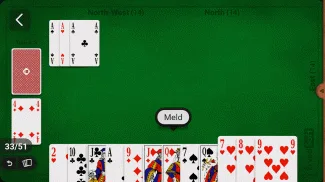
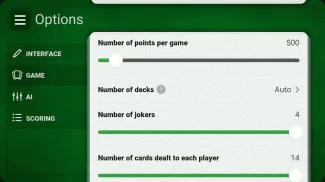
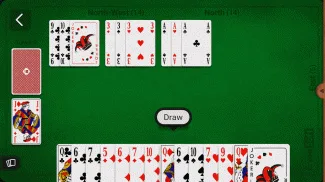
Welcome to Rummy, the classic card game loved by millions! Made for Indian players, this app lets you play with 2-4 opponents controlled by smart AI. You can change rules, pick card counts, and even add jokers. This guide will teach you everything—from basic play to secret tips to win. Let’s dive in!
What Is Rummy?
Rummy is a card game where you make “combinations”:
- Set: 3+ cards of the same number, different suits (e.g., 5♥, 5♦, 5♠).
- Sequence: 3+ cards of the same suit in order (e.g., 3♣, 4♣, 5♣). You play against AI opponents. The goal is to get rid of all your cards by forming combinations first.
Basic Rules of Rummy
Simple steps to start:
- Players: 2, 3, or 4 (all AI-controlled).
- Deck: Standard 52-card deck (jokers optional).
- Deal: Each player gets 7-14 cards (you choose!). The rest form a draw pile; 1 card is face-up (discard pile).
- Turns: Pick 1 card (from draw pile OR top of discard pile), then discard 1 card.
- First Meld: You must form a combination worth a set number of points (you choose!) before adding more.
- Winning: First to get rid of all cards (or lowest points if round ends) wins!
Step-by-Step: How to Play Rummy
Follow these easy steps:
- Download & Install: Get the app from Google Play Store (size: 38MB). Needs Android 7.0+.
- Open & Choose Mode: Select “New Game.” Pick 2, 3, or 4 players.
- Customize Rules (fun part!):
- Cards per player: 7, 10, 13, or 14.
- Jokers: 0, 1, 2, 3, or 4.
- AI level: Easy, Medium, Hard.
- First meld points: 30, 40, 50, or 60.
- Can you keep a discard? Yes/No.
- Start the Game: Tap “Deal.” You’ll see your cards.
- Your Turn:
- Pick a card (draw pile = mystery card; discard pile = see top card first).
- Check if you can make a set/sequence. Drag cards to the “Meld Area.”
- Discard 1 card you don’t need (tap card, then “Discard”).
- End the Round: When you have no cards left, tap “Declare.” AI opponents finish their turns.
- Score: App adds points for leftover cards (deadwood). Lowest score wins!
Key Rules You Must Know
Don’t make mistakes!
- Card Values (Deadwood):
- Ace = 1 point
- 2-10 = Face value (e.g., 7=7 points)
- Jack, Queen, King = 10 points each
- Joker = 0 points (wildcard—use as any card!)
- First Meld Rule: You can’t add to combinations until your first meld hits the point target (e.g., 30 points).
- Final Card: Some rules let you play your last card instead of discarding—check settings!
Table: Customizable Rules in Rummy
| Setting | Options |
|---|---|
| Players | 2, 3, 4 |
| Cards per Player | 7, 10, 13, 14 |
| Jokers | 0, 1, 2, 3, 4 |
| AI Difficulty | Easy, Medium, Hard |
| First Meld Points | 30, 40, 50, 60 |
| Keep Discard Card? | Yes, No |
| Final Card Action | Discard Only, Play or Discard |
Table: Card Values & Examples
| Card Type | Value (Points) | Example Set | Example Sequence |
|---|---|---|---|
| Ace | 1 | Ace♠, Ace♦, Ace♣ | Ace♥, 2♥, 3♥ |
| Number (2-10) | Face value | 8♠, 8♦, 8♣ | 4♦, 5♦, 6♦, 7♦ |
| Face (J/Q/K) | 10 | King♠, King♦ | Jack♣, Queen♣, King♣ |
| Joker | 0 | Joker + 5♠ + 5♦ (set) | Joker + 9♥ + 10♥ (seq) |
Winning Strategies for Beginners
Want to beat AI? Try these:
- Start Small: Make short sequences/sets first (3 cards). Add more later.
- Use Jokers Wisely: Save jokers for hard-to-make combinations (like a King-Ace sequence).
- Watch Discards: If AI throws away 7♠, they probably don’t want it—pick it up if you need it!
- Dump High Cards: Kings, Queens, Jacks (10 points each) add up fast. Discard them early if not in a combo.
- Practice First Melds: Aim for exactly the first meld points (e.g., 30). Too low = can’t declare yet; too high = waste cards.
Advanced Tips to Beat Hard AI
Ready to challenge Hard mode?
- Block AI Sequences: If AI picks 5♦, keep 6♦ and 7♦ to stop their 5-6-7 sequence.
- Count Cards: Remember which cards are gone. If 3 Kings are discarded, the 4th is safe to keep.
- Bluff with Discards: Throw away a card you need but hope AI ignores (e.g., discard 2♠ if you want AI to think you hate spades).
- Plan Two Combos: Always try to build two combinations at once (e.g., a set of 7s and a sequence of hearts).
Game Features Indian Players Love
- Smooth Animations: Cards slide, flip, and shuffle like real cards.
- Advanced AI: Opponents make smart moves—they bluff, block, and adapt.
- Statistics: Track wins, average score, and favorite rules in “Stats” tab.
- Game Backup: If app closes, your game saves automatically. Resume later!
- Rule Book: Tap “Help” to read full rules anytime.
Why Play Rummy?
- Endless Variety: Change rules to make it easy (7 cards, 0 jokers) or hard (14 cards, 4 jokers).
- No Internet Needed: Play offline—great for travel or no Wi-Fi days.
- Family Fun: Kids (PEGI-12) and adults can play together.
- Free to Play: No hidden costs. Earn virtual coins for winning!