Welcome to Gin Rummy Master, the most exciting online card game made for Indian players! If you love card games and want to have fun while learning to win, you’re in the right place. This guide will teach you everything about Gin Rummy Master—from basic rules to secret tips that help you beat opponents. Let’s start!
What Is Gin Rummy Master?
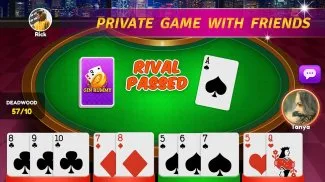
Gin Rummy Master is a popular card game where you make “sets” (same number, different suits) or “runs” (same suit, numbers in order). You play against others online or offline. The goal is to get rid of deadwood (cards not in sets/runs) faster than your opponent. It’s easy to learn, fun to play, and has cool features like live chat and leaderboards.
How to Play Gin Rummy (Basic Rules)
Before you start, know these simple rules:
- Cards Used: A standard 52-card deck (no jokers).
- Deal: Each player gets 10 cards (some versions use 11). The rest form a draw pile; one card is face-up as the discard pile.
- Turns: On your turn, pick a card from the draw pile OR take the top discard pile card. Then, discard one card you don’t need.
- Knocking: If your deadwood points are 10 or less, you can “knock” to end the round. Your opponent then tries to reduce their deadwood.
- Going Gin: If all 10 cards form sets/runs (no deadwood), you “go gin” and win extra points.
Step-by-Step Guide to Start Playing Gin Rummy Master
Follow these easy steps to begin:
- Download & Install: Get the app from Google Play Store (size: 53.5MB). Requires Android 7.0+.
- Login: Use Facebook or create an account. It’s fast and secure!
- Choose Mode: Pick “Multiplayer” (play with global gamers), “Private” (invite friends), or “Offline” (turn-based, no internet needed).
- Learn Basics: Tap “Tutorial” to watch a short video. It shows how to form sets/runs.
- Start a Match: Click “Play Now” in multiplayer mode. You’ll get 10 cards.
- Your Turn: Look at your cards. Do you have 3+ same numbers (set) or 3+ same suit in order (run)? Keep those. Discard high-value cards (like Kings, Queens) if not in a set/run.
- End the Round: When you think you can win, tap “Knock” (if deadwood ≤10) or “Go Gin” (if all cards are in sets/runs).
- Score & Win: The app calculates points. The first to reach 100 points wins the game!
Key Rules You Must Know
Don’t make mistakes! Here are important rules:
- Card Values (Deadwood Points):
- Ace = 1 point
- 2-10 = Face value (e.g., 5=5 points)
- Jack, Queen, King = 10 points each
- Knock Penalty: If your deadwood is more than your opponent’s after knocking, you lose points!
- Gin Bonus: Go gin, and you get 25 bonus points plus the difference in deadwood.
- Undercut: If opponent’s deadwood is less than yours after knocking, they get 25 bonus points + your deadwood total.
Table: Scoring System in Gin Rummy Master
| Action | Points You Earn | Points Opponent Loses |
|---|---|---|
| Go Gin | 25 (bonus) + Deadwood Difference | All their deadwood |
| Knock (You Win) | Deadwood Difference | Their deadwood |
| Undercut (Opponent Wins) | Lose 25 + Your Deadwood | 25 (bonus) + Your Deadwood |
| Round Win (No Knock) | 100 (game win) | 0 |
Winning Strategies for Beginners
Want to win more? Try these simple tricks:
- Focus on Runs First: Runs (same suit, ordered) are easier to build than sets (same number).
- Discard High Cards Early: Kings, Queens, Jacks (10 points each) add up fast. Ditch them if not in a set/run.
- Watch the Discard Pile: See what your opponent throws away. They might be avoiding a suit/number.
- Save Aces: Aces are only 1 point and can start runs (A-2-3) or end them (Q-K-A).
- Practice Offline: Use offline mode to learn without losing points.
Advanced Tips to Beat Skilled Opponents
Ready to level up? These tips work:
- Bluff with Discards: Throw away a card you need but hope your opponent thinks is useless.
- Block Runs/Sets: If opponent picks a 7 of hearts, keep other hearts to stop their run.
- Count Cards: Remember which cards are gone. If 3 Kings are discarded, the 4th is safe to keep.
- Knock Early: Don’t wait too long. If your deadwood is low, knock before opponent improves their hand.
Game Modes Explained
Gin Rummy Master has 4 modes for every mood:
- Live Multiplayer: Play with real gamers worldwide. Chat, laugh, and compete!
- Private Room: Create a room, share code with friends, and play together. No strangers!
- Offline Turn-Based: Play anytime, anywhere. Take turns when you have time. Great for practice.
- Leaderboard Challenge: Climb ranks by winning matches. Top players get special badges!
Why Indian Players Love Gin Rummy Master
- Easy Controls: Big buttons, clear graphics—perfect for kids and adults.
- Variations Included: Play Straight Gin (no knocking limit), Oklahoma Gin (knock at 10+ deadwood), Hollywood Gin (3-score levels), and Tedesco Gin (special bonuses).
- Safe & Secure: Facebook login keeps your account safe. No hidden fees!
- Fun Community: Chat with players during games. Make new friends who love cards.
Table: Card Values & Examples
| Card Type | Value (Points) | Example Set | Example Run |
|---|---|---|---|
| Ace | 1 | Ace of Hearts, Ace of Spades | Ace-2-3 of Diamonds |
| Number (2-10) | Face value | 5 of Clubs, 5 of Diamonds | 7-8-9 of Hearts |
| Face (J/Q/K) | 10 | King of Clubs, King of Spades | Jack-Queen-King of Clubs |